Data being deɪ.tə

- Trusted Relationships in Exploitation
It basically means, people we trust very much. We all have people we trust with our life, be it family, friends and peers. Why do we trust them? because we know them and they know us very well, but this is where the catch unfolds, a threat actor can claim himself as your trusted person (family member, wife or best friend) forget about claiming that’s the least used way with mere 10% success probability, when a person’s system/device gets compromised, the attacker can fetch and look for the interaction that happened with the victim and his/her friends(by the means of text messages, social media and call logs), I know it’s pretty hard to grasp in the first explanation especially with my wording. Let’s see an example, putting aside the fact that I’m a wannabe Security Researcher.
Hypothetical scenario: My phone/system got compromised, the attacker has access to my information and everything. He had noticed that I frequently call and text to a close friend of mine called Nishtha, she trusts me and I do the same with her too, the attacker proceeds to act as me in a text message “Hey, I just got stuck in Chennai central station and missed my train, can you send me some 5k if possible to this account my bank got in hold? I’ll return it by evening. Just gotta book the tickets and have things to do here.” since she trusts me very much, she’ll send them and calls the attacker after doing(to confirm if the attacker received it or not) sadly by that time Nishtha’s number would’ve been blocked. He’d do the same with all of my recently contacted people, Some may reject, while some will pay. The same thing can be applied in companies too, just the roles are changed to “good colleagues”, It is possible in even in vendors and clients scenarios where the attacker can trick the either vendor side or client side employees to provide sensitive/confidential information. There are literally hundreds of scenario we can construct in such context. These days, we can’t trust anyone, In the heat of the moment we may not think straight and fall for such simple tricks. That’s where these attackers win.
2. Defense Evasion
Defense evasion is the term used when an attacker meticulously crafts and executes a perfect security breach without triggering any security measures, In simple ways, It’s the practice of hiding from active security methods that are implemented by the company such as endpoint security, intrusion detection systems, network security(firewall configs, honeypots) and many others. Such attacker can perform this only when he knows the existence of these protocols, to be aware of these things extensive information gathering is required often taking hours, because obviously these aren’t something that can be found on the outer pages or infrastructure, to call an attack “success” the attacker needs to cover his footprints and clear them entirely just like It never happened.
While I won’t say that this is some easy task, It’s highly possible with enough resources and patience. The attacker needs to have a good knowledge on the defense structure of the said target company. This is not some DDOS attack to think of a plan, on the way. If any attacker tries it without preparation, He shall be behind bars possibly in the sight itself. The hardest part is not doing or executing these sophisticated attacks, It is purely on how well the attacker can make it look like it never happened.
3. Bash history
Just like how a traditional browser stores the recently visited websites as history, the linux operating system does the same and saves it in a history file, whatever command we had typed in the terminal previously, can be seen and accessed. If you are running a linux operating system, go to your terminal and type the following.cat ~/.bash_history
Now, we can see the commands we had used. This is how it looks from my side running on Debian 6-64, Parrot security(I just reinstalled).
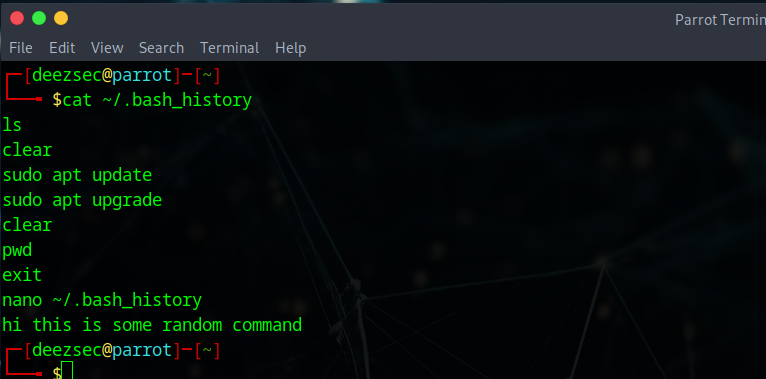 History of previous Terminal Interaction
It’s not restricted to valid commands only, whatever you type in it, is stored inside the history file. As I entered some text but It still saved it(even If it doesn’t get processed by the kernel It’d still be in the file). This file is important in info gathering, we all know that web-servers and all the web-app hosting family runs in linux environments because It’s considered safe, a threat actor can gain a wide info from accessing this history file.
4. Password Spraying
Password spraying is a method where the attacker uses a commonly used password combinations rather than using a bruteforce attack, why? a bruteforce attack takes too much of time and has very little to less chance of success, It can even trigger security measures implemented by the company at login fields such as a timeout or account lockup after certain number of failed login attempts, in such scenarios the company will alert the user on these failed login attempts via mail or text. That was for bruteforce attacks, now password spraying can be done with guessing the correct password combinations based on the particular user preferences, personal details, behavior etc.
A script can be created that uses a 10 questions as inputs(asking about the target just as CUPP) and then tries to guess about 15 passwords with a probability %, that seems like a good script to create. I’m not saying that a 10 wrong attempts won’t trigger security protocols, It will. The trick is to test them out in a time-based method by giving gap after each 3 or 4 attempts. In this way, the probability of guessing the correct password is high. Don’t forget that these days, It’s common for people to setup MFA.
5. Credential Stuffing
Credential stuffing is the process of using the breached user data in other websites to look for any hits containing the same passwords, most of the people use the same password everywhere. When one of the many websites, suffers a data breach, the breached data is dumped and sold for a good amount to attackers or anyone who might be having the interest. These credentials are then made into a big wordlist and then tried to see for possible hits on other websites where the attacker can access the accounts. This can be seen done on OTT platforms, they do this to sell the same accounts which were pwned to other customers. It can be done on employee login fields, student related fields and even targeting government officials.
This is a classic method of wordlist creation, If you give a search for commonly used passwords you can see a lot, the common passwords are taken from real website breaches. From the minds of real people. Just use a password manager and keep updating your passwords time-to-time.
That felt like forever, Hope you learnt something today. I’ll see you tomorrow again.
History of previous Terminal Interaction
It’s not restricted to valid commands only, whatever you type in it, is stored inside the history file. As I entered some text but It still saved it(even If it doesn’t get processed by the kernel It’d still be in the file). This file is important in info gathering, we all know that web-servers and all the web-app hosting family runs in linux environments because It’s considered safe, a threat actor can gain a wide info from accessing this history file.
4. Password Spraying
Password spraying is a method where the attacker uses a commonly used password combinations rather than using a bruteforce attack, why? a bruteforce attack takes too much of time and has very little to less chance of success, It can even trigger security measures implemented by the company at login fields such as a timeout or account lockup after certain number of failed login attempts, in such scenarios the company will alert the user on these failed login attempts via mail or text. That was for bruteforce attacks, now password spraying can be done with guessing the correct password combinations based on the particular user preferences, personal details, behavior etc.
A script can be created that uses a 10 questions as inputs(asking about the target just as CUPP) and then tries to guess about 15 passwords with a probability %, that seems like a good script to create. I’m not saying that a 10 wrong attempts won’t trigger security protocols, It will. The trick is to test them out in a time-based method by giving gap after each 3 or 4 attempts. In this way, the probability of guessing the correct password is high. Don’t forget that these days, It’s common for people to setup MFA.
5. Credential Stuffing
Credential stuffing is the process of using the breached user data in other websites to look for any hits containing the same passwords, most of the people use the same password everywhere. When one of the many websites, suffers a data breach, the breached data is dumped and sold for a good amount to attackers or anyone who might be having the interest. These credentials are then made into a big wordlist and then tried to see for possible hits on other websites where the attacker can access the accounts. This can be seen done on OTT platforms, they do this to sell the same accounts which were pwned to other customers. It can be done on employee login fields, student related fields and even targeting government officials.
This is a classic method of wordlist creation, If you give a search for commonly used passwords you can see a lot, the common passwords are taken from real website breaches. From the minds of real people. Just use a password manager and keep updating your passwords time-to-time.
That felt like forever, Hope you learnt something today. I’ll see you tomorrow again.