Hack a WordPress Website with Me

Hello there, welcome back. In this week’s security series, we will cover how we can hack a WordPress website and gain unauthorized access using some of the not-so complex methodologies. WordPress is a popular Content Management System(CMS) that allows for robust web management and creation for those with less coding knowledge. It amounts to 43% of total websitesin the world. Still, not every safe is secure, WordPress is also known for it’s long history of vulnerabilities. Let’s catch a misconfigured fish, out in our indexed ocean. Disclaimer All the content shown in this article is for educational purposes only. Please do not damage any website by following this article, the author holds no liability/responsibility in such cases. As long as you don’t cause damage, explore the vulnerabilities to your heart’s content. We will be using a few resources/tools to gather intel and source our targets, and as well as test them.
- Google Dorking : Targeting misconfigured/outdated WordPress websites from the infamous google indexing.
- Shodan: Sourcing done a bit better, using custom filters to target WordPress websites running old WordPress websites/plugins.
- WPScan: A CLI tool to test WordPress websites for existing vulnerabilities.
- DuckDuckGo Dorking: Incase google gives too much headache.
- Wpprobe: To enumerate Wordpress plugins. (If needed)
What is Dorking?
Dorking is the art of getting exact accurate search results when we search on search engines like google, we are telling the search engine what we are looking for, we use certain keywords to define what are the specifics. You’ll understand once you start exploring yourself. This is a cool list to check out.
Internal Directory Architecture of a WordPress/wordpress-root
│──wp-admin/# Core WordPress admin panel files
│├──css/# Admin panel styles
│├──images/# Admin panel images
│├──includes/# Internal PHP scripts for admin
│├──js/# JavaScript files for admin
│├──network/# Files related to multisite network
│├──user/# User management scripts
│├──admin.php# Main admin panel handler
│├──load-scripts.php#LoadsJavaScriptdynamically
│├──load-styles.php# Loads CSS dynamically
│├──options.php# Handles admin settings
│├──update.php# Handles WordPress updates
│└──…# Other admin-related files
│
│──wp-content/# Contains themes, plugins, and uploads
│├──plugins/# Installed plugins (potential vulnerabilities)
││├──vulnerable-plugin/# Example plugin with vulnerabilities
││└──security-logs/# Some plugins store logs here
│├──themes/# Installed themes (potential backdoors)
││├──theme-name/
││└──functions.php# Can be modified to inject malicious code
│├──uploads/# User-uploaded files (often exploited)
││├──2024/03/# Date-organized uploads
││├──shell.php# (If exploited, malicious shell could be uploaded)
│├──cache/# Caching plugins may create temporary files here
│├──upgrade/# Temporary files for WordPress updates
│└──…# Other content files
│
│──wp-includes/# Core WordPress PHP files
│├──assets/# Static assets (images, fonts, etc.)
│├──js/# JavaScript files for frontend
│├──php/# Core PHP scripts (important for attacks)
│├──functions.php# Core functions (can be a target)
│├──class-*.php# Various PHP class files
│├──version.php# Contains WordPress version info
│└──…# Other core files
│
│──.htaccess# Controls access rules (common target)
│──wp-config.php# Contains database credentials (high-value target)
│──index.php# Main entry point for WordPress
│──wp-login.php# WordPress login page (brute-force target)
│──wp-signup.php# Signup page (if enabled)
│──xmlrpc.php# Used for remote publishing (often exploited)
│──readme.html# May reveal WordPress version (information disclosure)
│──license.txt# WordPress license file
│──robots.txt# Can reveal restricted areas
└──…
Key Target Area:
1.wp-config.php-Containsdatabasecredentials;ifaccessed,itcanleadtofullsitetakeover.
2.wp-content/uploads/-Ifnotsecuredproperly,attackerscanuploadmaliciousfileslikePHPshells.
3./wp-admin/-Adminpanelaccesscanallowfullcontroloverthesite.
4./xmlrpc.php/-Canbeusedforbrute-forceattacksandDDoSamplification.
5.PluginsandThemes(wp-content/plugins/&wp-content/themes/)-Outdatedorvulnerableplugins/themescanprovideanentrypointforattackers.
6..htaccess-Canbemodifiedtohidebackdoorsorredirectusers.
That’s some basic information, I don’t like to overwhelm with so much information, I don’t like that way either, I believe in ‘learning by doing it’, once your machine is booted, we can begin.
I have my Parrot ready for today’s adventure. My intended attack flow is shown below, for better clarification. Please note that, it’s only for my reference, you can do a lot, not just these.
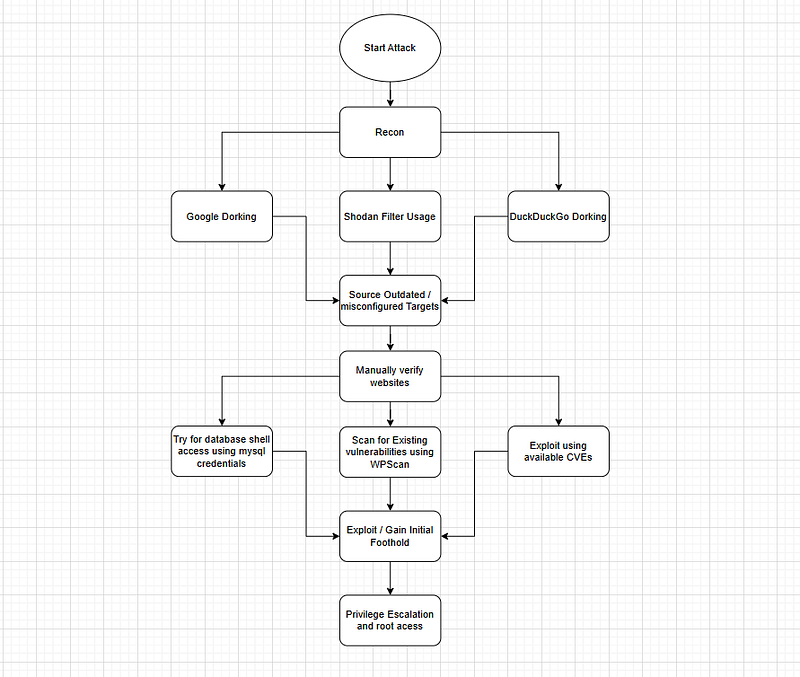
The first step we need to do is hunt for a target, we need a target which is susceptible to our attack flow. No fuss. I intend to show how there are bunch of these old websites ready to be hacked. And how Threat actors can utilize these websites for their criminal campaigns. I won’t say that doing this is easy, but it is a do-able task. Let’s go ahead. A few resources to get started. (I had to convince Claude that I’m not doing anything unethical to get these)
#1 Manual Hunt using Dorks / Information Disclosure
WordPress Vulnerability Hunting Dorks We can use the following dorks to explore available websites and see the exposed content, they work best in enumerating targets explicitly.
Exposed Configuration Files
“wp-config.php""DB_PASSWORD” -“Warning” -“Error” -“Notice” -“syntax” -“tutorial” -“example”
inurl:“/wp-config.php” ext:php intitle:“Index of”
intitle:“Index of""wp-config.php.bak”OR”wp-config.php.old”OR”wp-config.php~“
inurl:wp-config.php ext:bak OR ext:old OR ext:txt
Database Backups
intitle:“index of""wp_users.sql”OR”wordpress.sql”OR”database.sql”
filetype:sql intext:“wp_users” intext:“user_login” intext:“user_pass”
intitle:“Index of” intext:wp-content/uploads/backupbuddy
intitle:“Index of” intext:backup filetype:sql intext:wp_users
Debug Logs & Error Information
inurl:wp-content/debug.log ext:log
intext:“WordPress database error”intext:“Warning”intext:“Error”
inurl:error_log inurl:wp-content ext:log
Vulnerable Plugin Detection
inurl:wp-content/plugins/wp-file-manager
inurl:/wp-content/plugins/elementor
inurl:“/wp-content/plugins/contact-form-7”
File Upload Vulnerabilities
inurl:“/wp-content/uploads/gravity_forms/“
inurl:“wp-content/uploads/formidable”
inurl:“/wp-admin/admin-ajax.php” ext:php
Admin & Login Pages
intitle:“WordPress › Login” inurl:wp-login
inurl:wp-login.php?action=register
intext:“Welcome to the famous five minute WordPress installation process”
Installation & Reset Files
inurl:wp-admin/setup-config.php intext:“Welcome to WordPress”
inurl:wp-admin/install.php intext:“Welcome”
inurl:wp-login.php?action=rp intext:“password reset”
Theme Vulnerabilities
inurl:wp-content/themes/ intext:“index of /“
inurl:wp-content/themes/twentytwenty
inurl:wp-content/themes/twentynineteen
User Enumeration
inurl:“/wp-json/wp/v2/users”
inurl:/?author=1
API & XML-RPC Issues
inurl:xmlrpc.php intext:“XML-RPC server accepts POST requests only.”
inurl:wp-json/wp/v2 filetype:json
Environment Information
filetype:env intext:DB_PASSWORD intext:WORDPRESS
intext:“wp-settings.php” intext:“environment”
Server Configuration Files
intitle:“Index of” intext:wp-content intext:“.htaccess”
inurl:wordpress ext:conf OR ext:cnf OR ext:ini
Forgotten Backup Tools
inurl:wp-content/uploads/ intext:“index of /“
inurl:wp-content/ai1wm-backups intext:“index of /“
Development/Staging Sites
inurl:wp-content intext:“staging” OR intext:“development” OR intext:“test”
site:dev..com inurl:wp-login.php
site:staging..com inurl:wp-login.php
Remember to exclude sites when using dorks, there would be so much of noise that our real targets would be hidden somewhere deep inside the pages, most of the noise we would get is from Stackoverflow, Wordpress communities, Github and Gitlab. We can use the following to block them from search results:-site:example.com
-site:github.com -site:stackoverflow.com -site:wordpress.com -site:wordpress.org
We will use the following dork to hunt for exposed mySQL database config files, it will contain the username and password from which we can access the database and try to dump the entire database containing admin creds.”wp-config.php” (“DB_PASSWORD” OR “AUTH_KEY” OR “SECURE_AUTH_KEY”) -“Warning” -“Error” -“Notice” -“syntax” -“tutorial” -“example” -“sample” -“documentation” -site:github.com -site:stackoverflow.com
This dork is explicitly searching for the indexed pages which contains “DB_PASSWORD”, from there we can escalate.
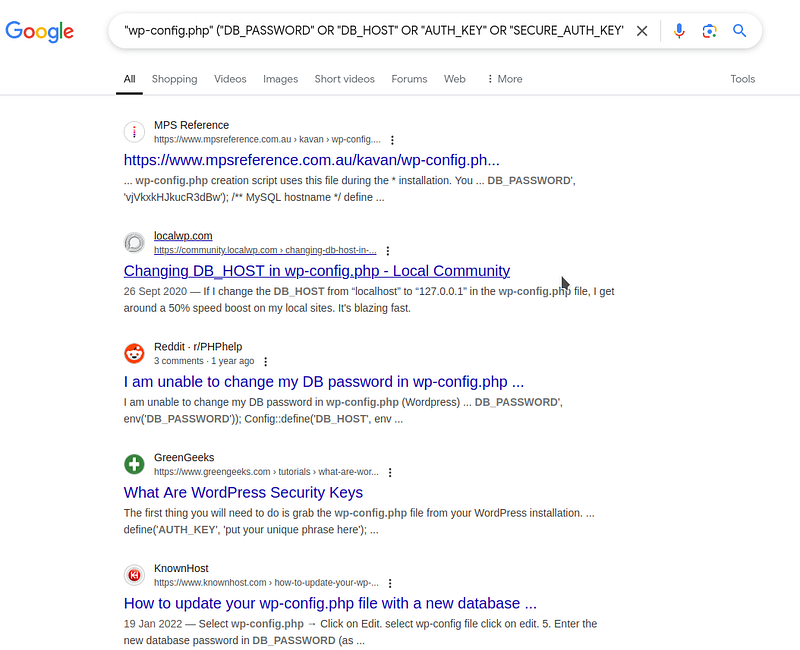
As we can see, we are getting too much of noise from other sites, let’s fine-tune our dork further.”wp-config.php” (“DB_PASSWORD” OR “AUTH_KEY” OR “SECURE_AUTH_KEY”) -“support” -“Warning” -“tutorial” -“how” -“Error” -“Notice” -“syntax” -“article” -“help” -“tutorial” -“example” -“sample” -“documentation” -“blog” -“forums” -“archive” -site:github.com -site:stackoverflow.com -site:wordpress.com -site:wordpress.org -site:reddit.com -site:gitlab.*.com -site:generatewp.com -site:acunetix.com -site:searchcode.com -site:wp-kama.com
Our dork got a bit long, but it’s a lot better than the previous one.

As we can see, we got a few exposed /wp-config.php files containing DB credentials.
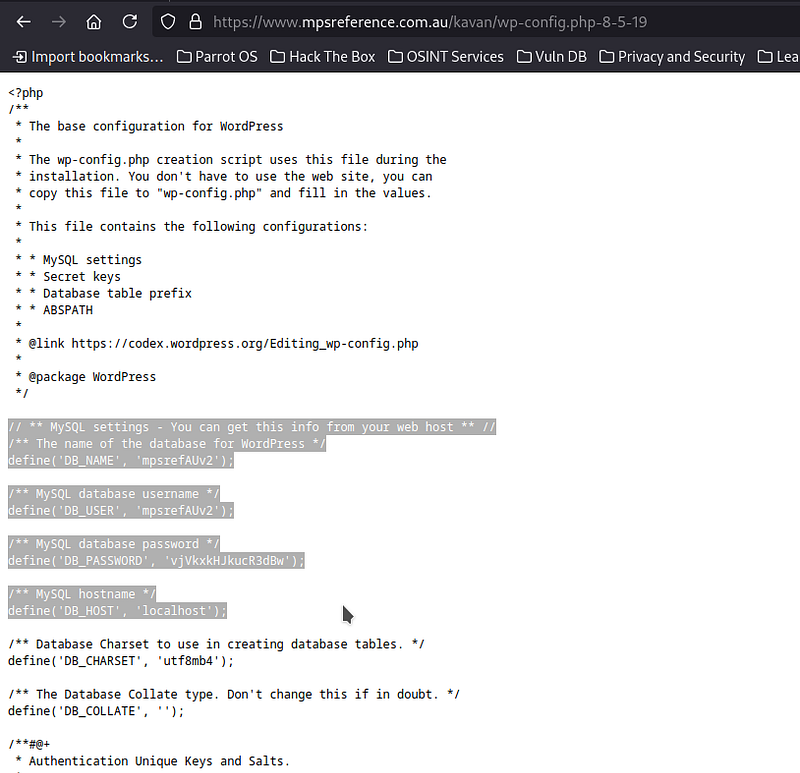
I’ve seen through many of the websites and found that the database is configured in localhost, the credentials are useless for us if its localhost. In the search, I did found servers running on static IPs, but they are dead/no longer maintained. Hunting manually in this way is cumbersome, but yields higher results and more possibility of finding a vulnerable web rather than focusing on single website. So, why bother doing this when WPScan exists? we aren’t looking to gather credentials directly from dorks, we are sourcing our plausible targets from this way. Straight up searching for some WP website and launching the tool is not fun, atleast for me. I’ve selected a few targets from Dorking:
- [REDACTED]
- [REDACTED]
- https://theappgenie.com/
Let’s have the WPScan do the work for us this time.
If you haven’t installed WPScan yet, use the below command to do so.gem install wpscan
wpscan -h #check installation status After installing, make an account on https://wpscan.com/register/ to get an API. Always use a fake mail address to keep your activity and your OPSEC safe from prying eyes of curious employees/developers.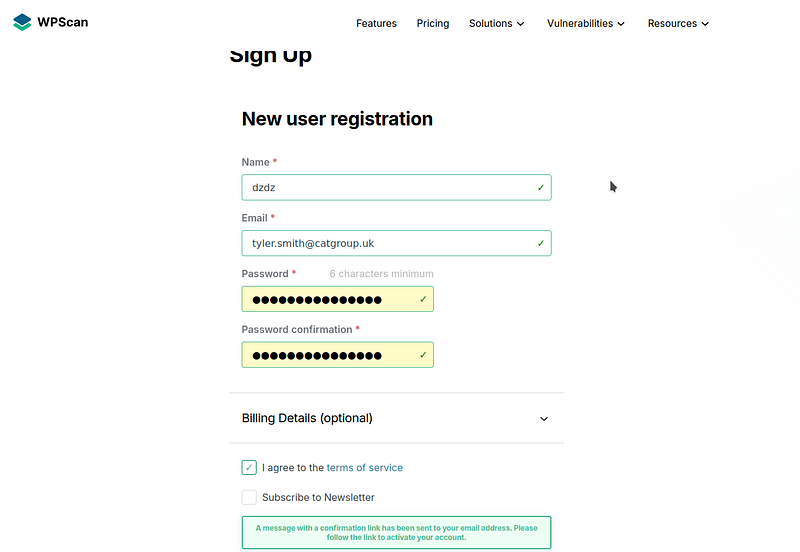
#2 Target Enumeration using WPScan
First, we will run a basic WPScan.wpscan —url https://theappgenie.com/ —random-user-agent
We can get quite the info even without providing an API, let’s see what we will get for now, we will use the WPScan API later. As it’s limited. Not like we can’t make another account(lol), its surprising to me as they (WPScan team) didn’t implement anti-account abuse mechanisms such as reputation check, domain verification and blacklist checks on the registration form. I can create multiple accounts, just for the sake of testing more webs.
WPScan gave us some information.
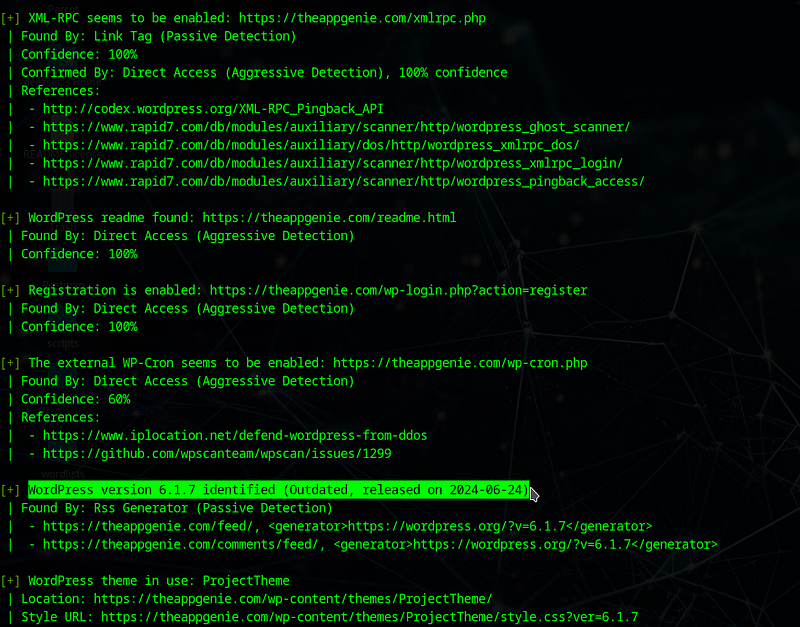
As we can see, we got a few metasploit modules, and one interesting find is “XML-RPC”. The metasploit modules are more focused on DoS than website takeover. So, let’s focus on the wordpress version and XML-RPC. I’ve found this blog to be very useful knowing the workaround with XML-RPC, read it to get a clear shot of it. This medium article is great to know more about it. What is this XML-RPC? XML-RPC is an API that let’s administrators/web owners to post, delete, edit content. It is turned on default from WP version 3.5. We can check if it exists by just appending “/xmlrpc.php” to our target, not a surprise but it is vulnerable to all the attacks:
- Brute-Force Login via system.multical (For multi-Bruteforcing)
- User Enumeration via wp.getUsersBlogs (Single attempt bruteforce)
- Remote Code Execution (RCE) via wp.uploadFile (Malicious file upload)
- DDoS via pingback.ping (Send requests from the target server to another victim of your choice)

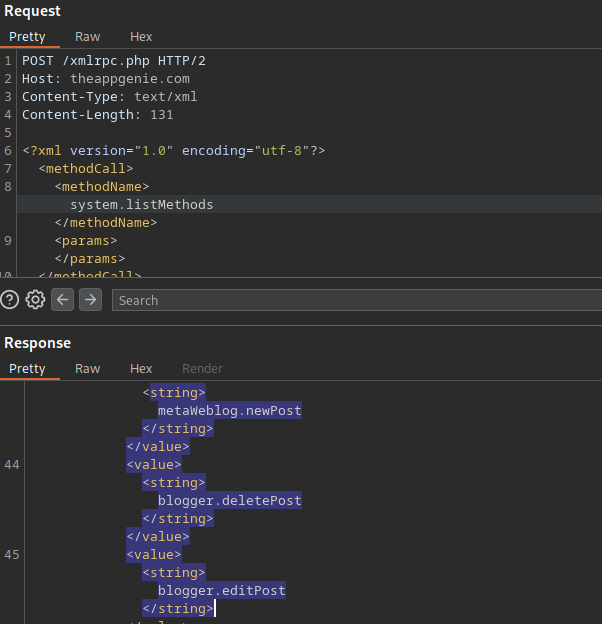
Using burp, we can send the request with “POST” header and add the required XML content it expects.<?xml version=“1.0” encoding=“utf-8”?>
<methodCall>
<methodName>system.listMethods</methodName>
<params></params>
</methodCall>
I have got all the existing methods from the server.
So, can we upload a reverse shell into the server and get inside?
No. I’ve tried making a shell and uploading into the server, it needs administrator privilege to successfully upload any file. So, we get “403” instead.
Exposed XML-RPC is most feasible for bruteforce attacks, we can just include multiple credentials in one request and send it to test, it gets even convenient with burp’s intruder. For some reason, I never liked bruteforcing my way, I can load rockyou.txt paired with Administrator, it won’t take much time, but, No. Why? to rely on bruteforcing is assuming that the target is dumb and uses a weak password, I don’t like to assume. I like a foolproof method, this might be arrogant coming from me in the context of security, as we all know how much of people use weak passwords. I do have my preferences. If you ever find such target, I suggest using bruteforce approach.
I’ll find another way. Back to finding exploits on WP version: 6.1.7.
By supplying the API to WPScan, I found a few vulnerabilities.
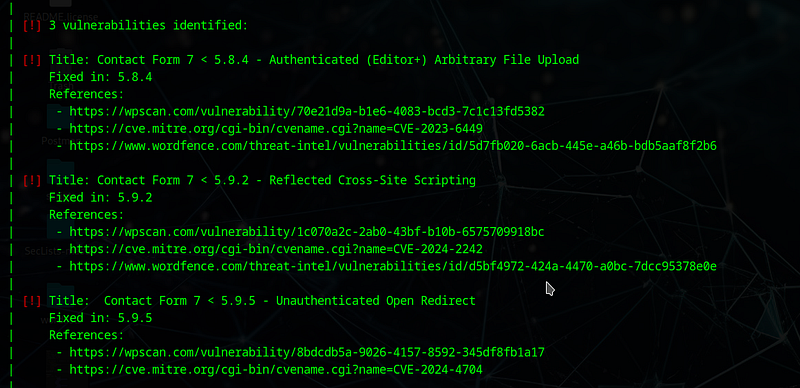
The File upload one is looking more feasible and straightforward than the XSS one and OR. I’ve also got plugin vulnerabilities, but all 3 of them are XSS. Elevating website takeover from XSS is painfully long and tomorrow is a Monday, so, I’ll stick with the straight arrows that** pierce** for now.
By checking out the Contact form 7 File upload vulnerability, we got a CVE ID: CVE-2023–6449. And information about the vulnerability.

Requires: “**Authenticated attackers with editor-level capabilities **to upload arbitrary files on the server”, I really don’t have an account as of now, I guess, time to make one and see it.

I tried searching for available exploits, so far, there’s not even a single exploit available to leverage. Even exploit-db has none. This is like searching for fruits in Ice age. I’ll try making an exploit.
After an hour, I’ve come to my senses that the vulnerability only allows us to upload the shell, if we’re talking RCE through shell upload, we need to execute the shell, which is not possible unless we do** exploit chaining **through local file inclusion(LFI) or Race Condition. Apparently, they aren’t possible either. (It may but I didn’t got it through my methodology which is testing parameters inside projects and templates using LFImap)
I don’t want to change targets, at this point, I can just find a basic Server side vulnerability or a file upload vulnerability inside and gain access, but that makes no sense, since, we’re explicitly talking about WordPress being the reason of compromise.
**New Target: **[REDACTED]
Rinse and repeat the same way.
After going through multiple misconfigured websites with 10+ vulnerabilities existing and CVE assigned, what I’ve found is that, most of them **do not have an exploit **or PoC lying around. Unlike a traditional article where one writes after testing the method, I’m concurrently testing and writing(lol). There’s this Japanese site which literally contains the most number of vulns I’ve seen on any WP web.
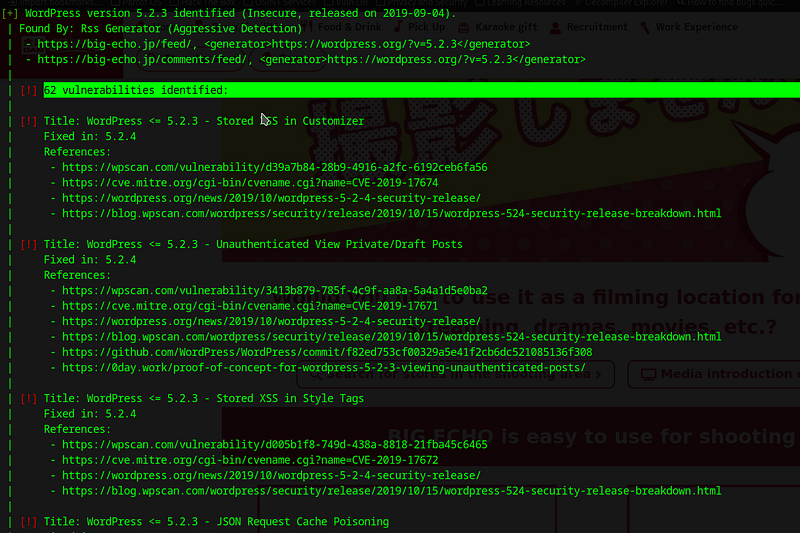
I was trying to exploit the SQLI CVE-2022–21661 and then,

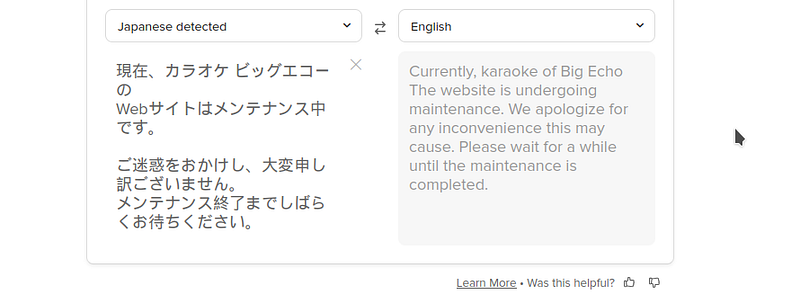
Ghauri and SQLmap really overwhelmed it, the DoS was unintentional from my side. Now, all the time spent on enumerating the exploits gone to waste as they would be blacklisting my IP from accessing it, best guess.
Back to another target I guess. This was also unsuccessful.
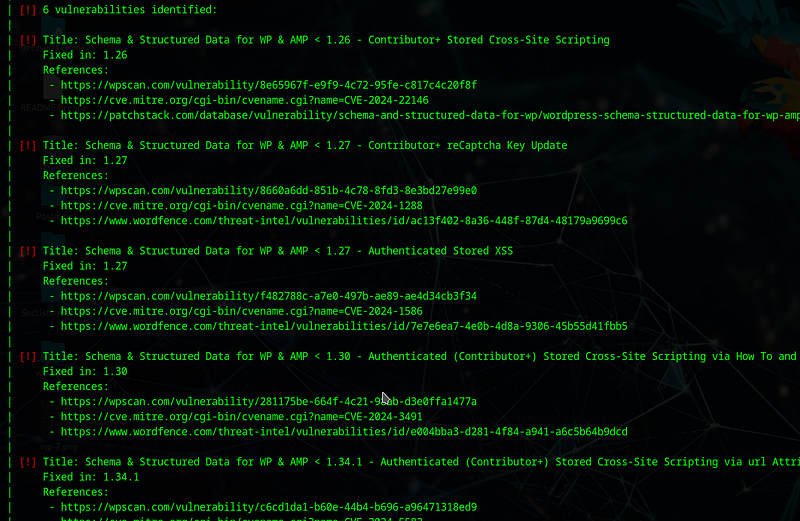
Exploiting each vulnerability / testing them is a labor intensive task, In security, this is obsolete, as a security researchers, we often need to sit for hours facing one target and stare at the ceiling saying “Why isn’t this damn exploit working?”. All this constant work really helped me get a bunch of vulnerabilities in a website hosting it’s bug bounty program, I’ll try to exploit them and get some $$, who knew a simple dork at 3 am can lead to treasures? For now, I’m a bit tired, and it’s 4 AM now, lol. I will continue this with the bug bounty web’s exploitation and chain that to here, of course to prove my point that “WordPress websites are insecure.” I really don’t want to publish an incomplete article, but I believe I’ve gone through a lot of methods here. I will add stuff again. If WP wasn’t so secure, there wouldn’t be so many websites right? I will be back with a working exploit. If you’re wondering what’s with that ‘[REDACTED]’ those are the webs I’ve tried and replaced multiple times, so, just made a placeholder. If you’ve read all that, thank you, I made it long accidentally. (I’m not a pro in web) I’ll see you in the next one. Keep hacking.